

The Garmin Foretrex 801 is a beast of a GPS navigator built for serious adventurers. It’s got all the bells and whistles you crave: rugged military-grade construction, a super clear monochromatic display for any lighting condition (including night vision compatibility!), and even tactical features like jumpmaster mode and a kill switch.
I’ve been using a foretrex for at least seven years now. I grew up on the 401, and it was a great little device which gave me no issues over the years. Then I spent time using the 601, and it seemed to constantly be disconnecting from satellites, rendering it mostly useless to me in the field. Then comes the 801.
There’s good and not so good. Before you strap on this GPS and think you’re ready to disappear into the wilderness, there’s a bit of a hurdle to jump. My unit, fresh out of the box, wouldn’t actually function properly until I downloaded a software update. None of the previous units have ever required this, but it would not save a GPS waypoint properly until after the update was completed. I spent a long time on the phone with customer support (hard to find telephone number), and through the heavy snark of the representative I learned that it comes pre-loaded with just the bare essentials (“foundational software” according to Garmin) to get it running at the most basic level.
This wasn’t a huge deal for me – downloading the update was quick and painless. But it is a bit of an annoyance, especially considering the price tag. Imagine needing this for a critical mission, your GPS arrives downrange on a deployment and you get stuck fiddling with updates at the last minute. Which require you to either connect it to a cell phone with data service (using the Garmin Explore app) or a PC which you are allowed to connect a USB cable to, and install the Garmin Express program on. You’d be completely stuck until you had access to some WiFi.
Before you buy, understand this device does not show any maps or topography overlays to help you navigate terrain. There are free maps in the Garmin Explore App, but they do not show on the device screens. This GPS is primarily just to put in coordinates, and track from point to point. (Or for jumping). If you need a hiking GPS, go with the eTrex, GPSMAP, or Montana devices.
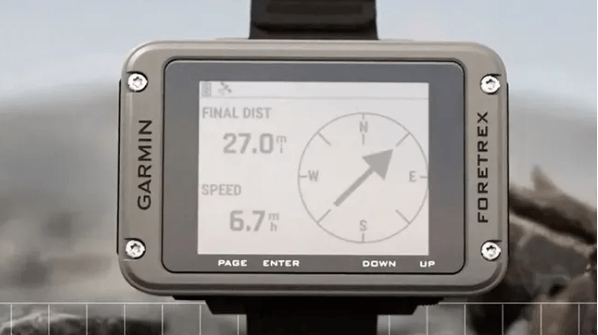
Software hiccup aside, here’s what I loved about the Foretrex 801:
Most of the improvements since then have been relatively minor. I have seen some
- New screen: It is so much larger and more crisp to view than the older ones.
- GPS: They seemed to fix the connectivity issues from the 601, because I had no problems reaching satellites.
- Battery Life: This thing is a champ! Boasting up to 100 hours in GPS mode, you can explore for days on end without worrying about a dead battery.
- Rugged Build: Military-standard tough with a waterproof rating, this GPS can handle anything you throw at it (or drop it on).
- Tactical Features: Stealth mode, jumpmaster mode, and a kill switch make this a great option for military, search and rescue, or anyone needing those extra bits of security.
- Multi-Band Accuracy: This fancy feature means the Foretrex 801 utilizes more satellites for improved positioning accuracy, so you’ll never be lost for long.
- Smartphone Connectivity: Pair it with your phone for smart notifications and even receive messages from your inReach satellite communicator (subscription required).
Overall, the Garmin Foretrex 801 is a powerful and feature-rich GPS navigator. Once you get the initial software update out of the way, it’s a fantastic tool for anyone who needs serious navigation capabilities in a tough, reliable package. Just be sure to factor in the update time when planning your next adventure.
![Rest your aching bones like a pro with a Lightweight Camping Chair! [Field Tested]](https://scrollbits.com/wp-content/uploads/2024/04/tired-hiker-enjoying-a-folding-chair-and-a-beautiful-veiw.png?w=1024)


 ScrollBits
Leave a comment